
Divide and Conquer
[Github] 깃허브랑 구글 Colab 연동하기 본문
728x90
1. 드라이브 마운트

import os
from google.colab import drive
drive.mount('/content/drive/')
2. 경로 이동

cd /content/drive/MyDrive/3. 깃 클론

!git clone https://[Github 아이디]:[access token]@github.com/[Github 아이디]/[리포지토리 이름].git!git clone https://Jinsun-Lee:내토큰@github.com/Jinsun-Lee/[리포지토리 이름].git위 양식 중 뭐를 써도 상관없음
!git clone https://Jinsun-Lee:내토큰을여기@github.com/Jinsun-Lee/github-setting.git
cd github-setting
!git config --global user.email '내메일@gmail.com'
!git config --global user.name 'Jinsun-Lee'4. 브랜치 만들고 설정
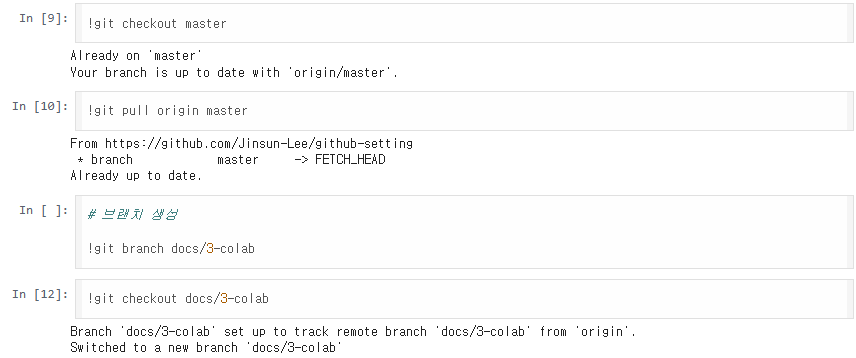
!git checkout master!git pull origin master# 브랜치 생성
!git branch docs/3-colab!git checkout docs/3-colab5. 작업 진행
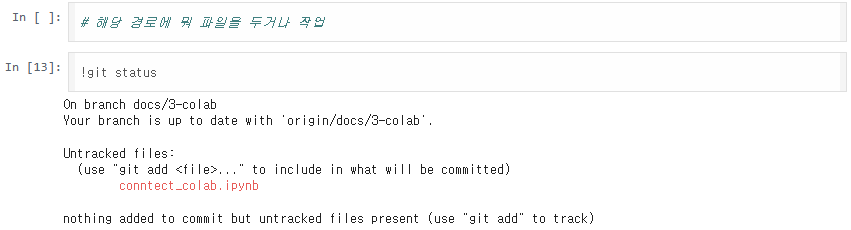
!git status수정 후 추가해 줄 것!!! 방법은 아래에서 알려줌
아무것도 안 하면 위에 내 사진처럼 됨
6. 작업 내용 커밋
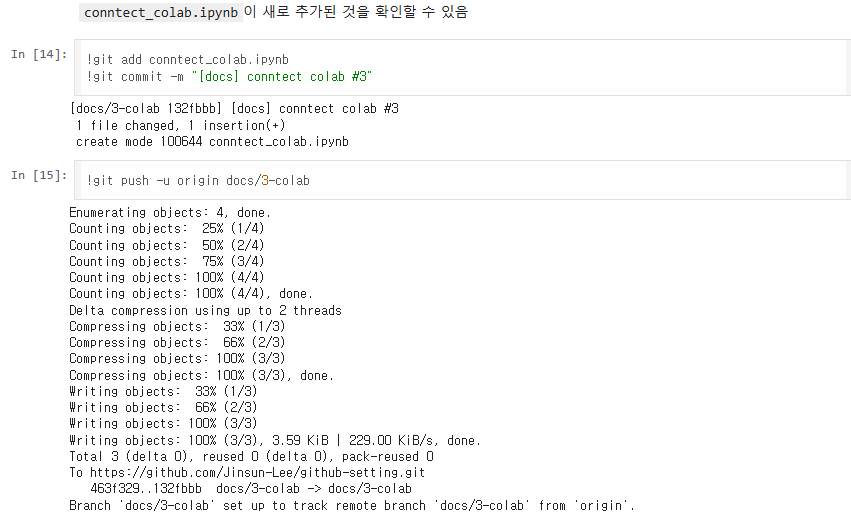
!git add conntect_colab.ipynb
!git commit -m "[docs] conntect colab #3"
!git push -u origin docs/3-colab
반응형
'2025 > CICD' 카테고리의 다른 글
| [Github] 내 깃허브 레포 전부 크롤링하기 (0) | 2022.04.28 |
|---|---|
| UML 작성 사이트 (0) | 2022.02.04 |
| Notion to [Github] (0) | 2022.02.03 |
| [Github] 자동 업로드 (0) | 2021.05.16 |
| sudo vim ~/.bashrc (1) | 2021.05.04 |
'2025/CICD' Related Articles
more

Comments